SCADA
SCADA screens are what an operator watches after the channels exist. A tag carries a name, a unit, a range and a scan rate. Alarms, mimics, recipes and a historian sit on top of those tags. MatDeck draws the screen in the same environment that acquired the data, so the tag and the widget are not maintained in two projects.
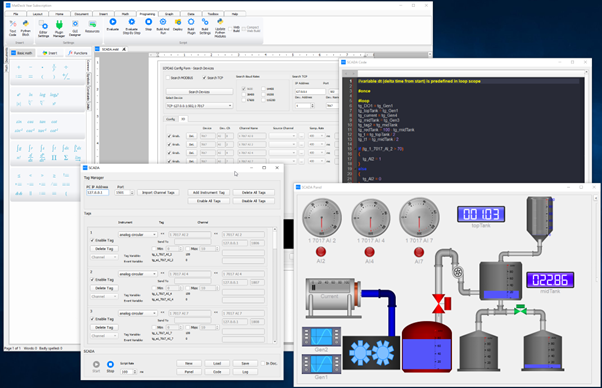
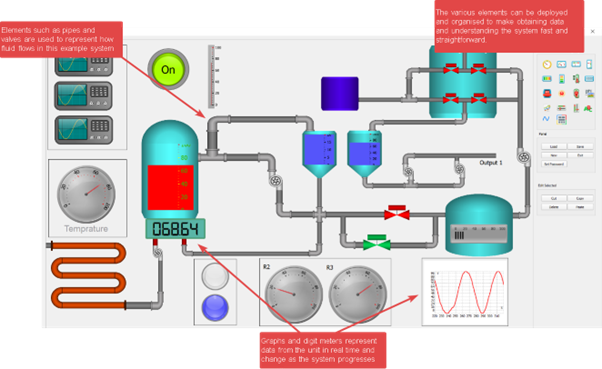
This group has 12 products: the dashboard builder, the tag database, alarms, process mimics, the historian, recipes, ready-made operator screens, a PLC tag bridge, a remote-station overview, scheduled reports, user roles and a runtime that shows the screens without the editor.
Set-points written on the screen go back to the tag. A viewer role can watch the same screen without that write. The historian reads the samples the acquisition group already logged.
Products in this group (12)
- SCADA Dashboard Builder — Operator screens bound to live tags.
- Tag Database Editor — Names, units, ranges and scan rates for every process tag.
- Alarm and Event Manager — Limits, priorities and an event list operators can acknowledge.
- Process Mimic Designer — Pipes, tanks and status symbols driven by tag values.
- Historian Viewer — Trend a tag's history without leaving the operator screen.
- Recipe Manager — Store and load set-point groups for a batch or a product.
- Operator Screen Pack — Ready screen layouts for overview, detail and alarm pages.
- PLC Tag Bridge — Read and write PLC tags through the SCADA tag database.
- Remote Station Monitor — Watch several stations from one overview.
- Report Scheduler — Shift and daily reports built from historian tags.
- User and Role Access — Operator, engineer and viewer roles for the same screens.
- SCADA Runtime Deployment — Run the finished screens without opening the design document.